
monday.com New Features - Week of January 3, 2023
1. Reporting (Static data) dashboard
The Problem / Opportunity 🎯
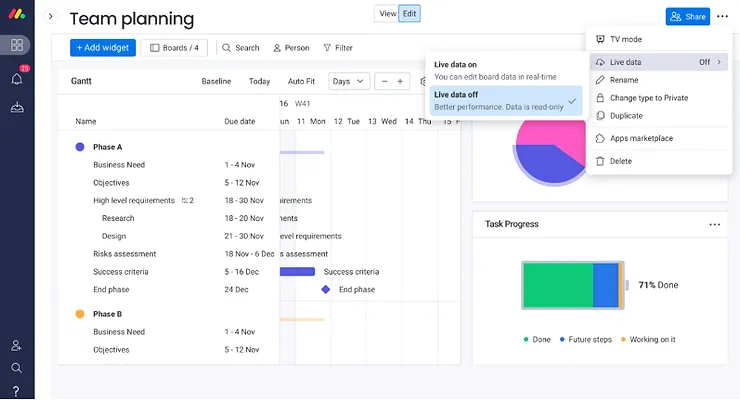
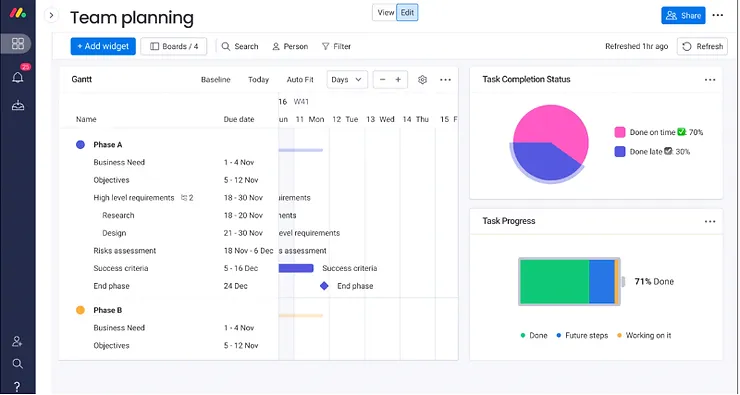
Today, dashboards with many items load slowly. After they load, they can be clunky because they show live data, meaning that the data is reloaded every time someone makes a change on one of the connected boards.
We're adding an option to turn off live data, enabling faster load times and smoother experience. The user will be able to refresh the data manually by pressing a button.
Target Audience / Personas 👫
This setting is intended for reporting use cases where users don't need live data. It will be most impactful for high-level dashboards connected to many large boards that are used by many people.
Solution 🧩
Reporting dashboard with much better performance but without live data.
2. Consider workspace name in “choose boards” dialog for dashboards
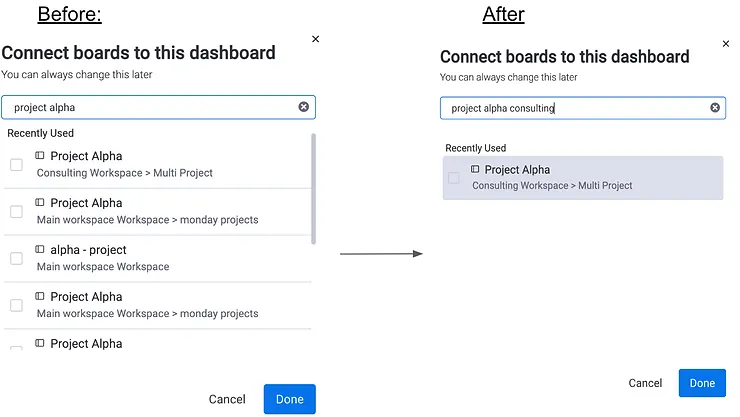
In the past, when you had lots of boards with the same name in different workspaces, it was hard to identify the relevant boards that you wanted to add to your dashboard. Introducing the new experience
To make it easier for users to find the boards they are looking for, we have included the workspace name within the search, so that you can search by board name AND/OR by workspace name.
No more getting bored searching for the right board 🤠
3. Removing the print option from dashboard and boards
We have removed the print option from dashboards and boards.
Why are we removing it:
With the new 'export to PDF' option in dashboard menu, the print feature is redundant.
'Export to PDF' offers same functionality as print, but with significantly better results: - formatting to ensure full widget length/width is included, and widget isn't cut in half - supports more widgets e.g. gantt -redundant widget information not shown e.g. filter option
Image comparison:
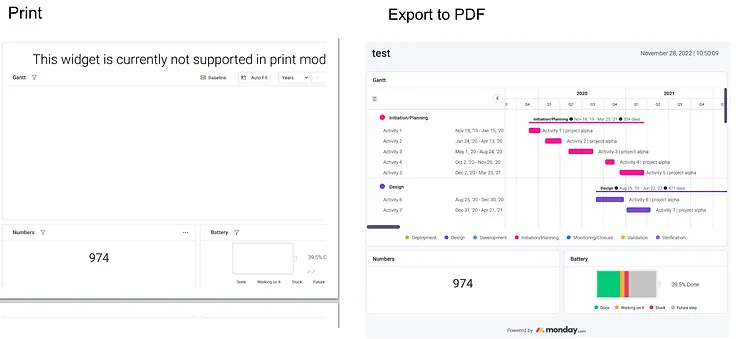
Important note- Export to PDF is not available for the board itself, only for views using widgets 360 infra (e.g. Gantt/Chart/dashboard view). If the user wants to export the board data, they can use 'export to excel', or users can still use their browser settings to print with the same result as previously clicking 'print':
Windows & Linux: Ctrl + p
Mac: ⌘ + p
💡 Stay tuned for more updates in the future!
👉👉Start your free trial with us today: www.achievan.com/mondaydotcom
SHARE


Subscribe now.
Sign up for our newsletter to get the most interesting stories of the day straight to your inbox before everyone else

We help teams improve Productivity by implementing no-code software solutions
A Division of
Execute Strategy, Inc.
Connect with Us


Copyright © Execute Strategy Inc. O/A Achievan 2023